If you understand this article fully, you will never be confused by async await in JavaScript code again.
We’ll cover:
- What async/await REALLY is
- How JavaScript executes it internally
- Event loop interaction (critical)
- Error handling (real rules)
- Performance traps
- Real-world patterns
1️⃣ First: What async/await is NOT
❌ It is not multithreading
❌ It does not block JavaScript
❌ It does not pause the whole program
✅ It is syntax sugar on top of Promises
2️⃣ The Single Most Important Rule
Every
asyncfunction ALWAYS returns a Promise
No exception. Ever.
Example 1: Returning a value
async function getNumber() {
  return 42;
}
Looks like it returns 42, right?
❌ Wrong.
getNumber(); // Promise { 42 }
JavaScript rewrites this internally as:
function getNumber() {
  return Promise.resolve(42);
}
Example 2: Throwing an error
async function fail() {
  throw new Error("Oops");
}
This becomes:
function fail() {
  return Promise.reject(new Error("Oops"));
}
🔥 This is CRITICAL for understanding error handling.
3️⃣ What EXACTLY does await do?
Key rule
awaitpauses ONLY the current async function, not JavaScript.
Example
console.log("A");

async function test() {
  console.log("B");
  await Promise.resolve();
  console.log("C");
}
test();
console.log("D");
Output
A
B
D
C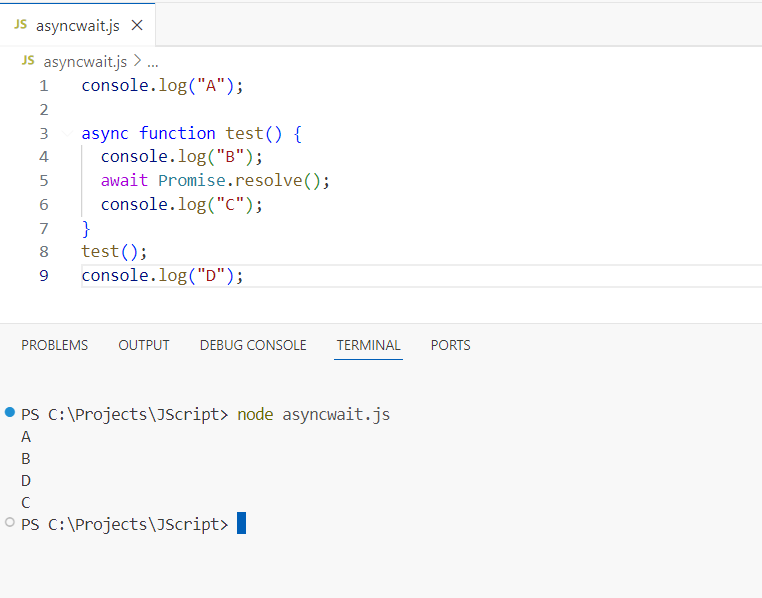
Step-by-step execution
console.log("A")→ prints A- Added to the call stack
- Executes immediately
- Prints
A - Removed from the stack
test()starts- Function is defined
- Nothing executes yet
console.log("B")→ prints Btest()is pushed onto the call stack- JavaScript starts executing its body
await Promise.resolve()
→ function is paused- Executes synchronously
- Prints
B
- Control returns to the main thread
Promise.resolve()creates an already-resolved promise.then()The callback is scheduled as a microtasktest()function is SUSPENDED- Execution exits
test() - The call stack is cleared
console.log("D")→ prints D- Added to the call stack
- Executes immediately
- Prints
D - Removed from the stack
- Promise resolves → function resumes
console.log("C")→ prints C- This resumes the
test()function right afterawait. console.log("C")runs- Prints
C - Async function finishes
- This resumes the
4️⃣ How await Works with the Event Loop
When JavaScript sees:
await somePromise;
Internally, it does:
- Convert value to a promise
Promise.resolve(somePromise) - Suspend function execution
- Schedule continuation in the microtask queue
- Resume after the current call stack finishes
Why this matters
Microtasks run:
- AFTER the current code
- BEFORE
setTimeout
Proof
setTimeout(() => console.log("timeout"), 0);

Promise.resolve().then(() => console.log("promise"));

async function test() {
  await Promise.resolve();
  console.log("await");
}

test();
Output
promise
await
timeout
🔥 This explains MANY “why did this run first?” questions.
5️⃣ await with NON-Promises
await 10;
This works because JavaScript converts it to:
await Promise.resolve(10);
So these are equivalent:
await fetch(url);
await Promise.resolve(fetch(url));
❌ Why this does NOT work
await setTimeout(() => {}, 1000);
Because:
setTimeoutreturnsundefinedawait undefinedresolves immediately
✅ Correct sleep implementation
function sleep(ms) {
  return new Promise(resolve => setTimeout(resolve, ms));
}

await sleep(1000);
6️⃣ Error Handling — REAL RULES
Rule 1
try/catchonly catches errors inside the SAME async function
❌ Wrong assumption
async function a() {
  b();
}

async function b() {
  throw new Error("fail");
}
This error is NOT caught in a.
✅ Correct
async function a() {
  try {
    await b();
  } catch (e) {
    console.error(e);
  }
}
Rule 2
awaitturns promise rejection into a thrown error
await Promise.reject("error");Is the same as:
throw "error";7️⃣ async/await vs .then() (Internals)
These two are IDENTICAL:
await fetch(url);fetch(url).then(res => res);So async/await:
- does NOT make code faster
- does NOT change execution model
- ONLY improves readability
8️⃣ Performance: Sequential vs Parallel
❌ Sequential (Slow)
const user = await getUser();   // 1s
const posts = await getPosts(); // 1s
⏱ Total = 2 seconds
✅ Parallel (Fast)
const [user, posts] = await Promise.all([
  getUser(),
  getPosts()
]);
⏱ Total = 1 second
Golden Rule
Only await sequentially when results DEPEND on each other.
9️⃣ Common async/await Bugs
❌ Bug 1: Forgetting await
const data = fetch(url);
console.log(data.user); // ❌ Promise
❌ Bug 2: async inside forEach
array.forEach(async item => {
  await save(item);
});
forEach does NOT wait.
✅ Fix
for (const item of array) {
  await save(item);
}
OR
await Promise.all(array.map(save));🔟 async/await in Frameworks
React
useEffect(() => {
  (async () => {
    const data = await fetchData();
    setData(data);
  })();
}, []);
Why?
useEffectcallback cannot be async
Node.js / Express
app.get("/", async (req, res) => {
  try {
    const user = await db.findUser();
    res.json(user);
  } catch {
    res.status(500).send("Error");
  }
});
🧠 Mental Model
Think of await as:
“Pause THIS function, let JS continue everything else, then come back here later.”
JavaScript:
- keeps running
- keeps rendering
- keeps handling events
🏆 Production Best Practices: async await in JavaScript
✔ Always handle errors
✔ Use Promise.all for parallel work
✔ Never assume async data exists
✔ Avoid async in forEach
✔ Combine with optional chaining