If you’re using Entity Framework Core (EF Core) in your application, you already know how effective and easy written program. But convenience can come at a cost; badly written queries can seriously hurt performance. You want to know how to improve EF Core 10 performance?
In this article, we’ll break down 5 common slow query problems in EF Core 10 and show you exactly how to resolve them. These are day-to-day issues faced by developers that can make your app slow, and how to turn things around fast.
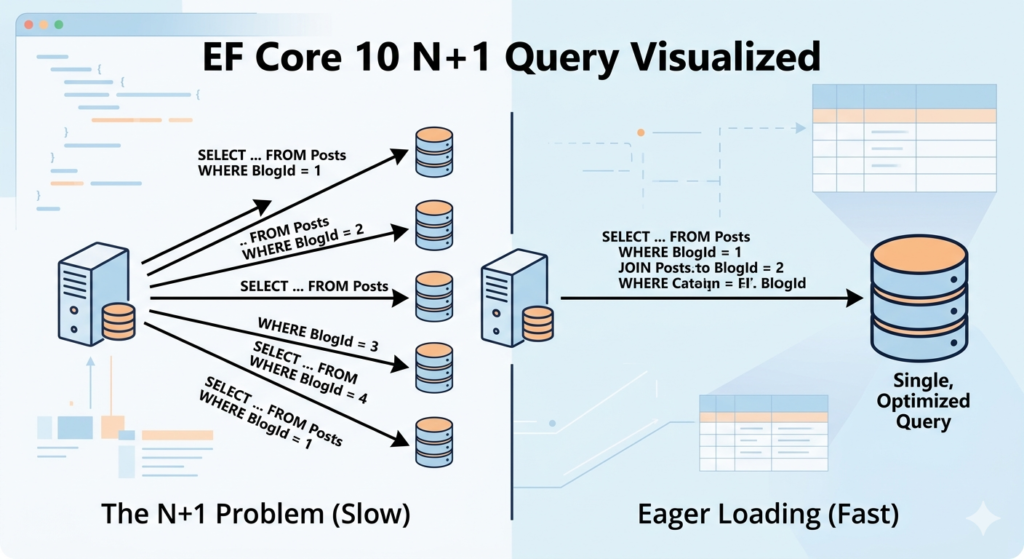
1. The N+1 Query Trap vs. Filtered Includes
The most common performance issue is fetching a list of items and then hitting the database again for every single child record.
The “Slow” Method(N+1):
var blogs = await context.Blogs.ToListAsync();
foreach (var blog in blogs)
{
    var posts = await context.Posts.Where(p => p.BlogId == blog.Id).ToListAsync();
}
The EF Core 10 “Fast” Method(Filtered Include):
var blogs = await context.Blogs
    .Include(b => b.Posts.Where(p => p.IsPublished)) // Filtered Include
    .AsNoTracking() // Huge memory saver for read-only lists
    .ToListAsync();
2. The “Cartesian Explosion” vs. Split Queries
When you include multiple collections (e.g., Blogs with Posts, Comments, and Tags) SQL generates a huge “Cross Join” that repeats data unnecessarily.
The Fix: .AsSplitQuery() This tells EF Core to execute separate SQL statements for each collection and “stitch” them together in memory.
var heavyData = await context.Blogs
    .Include(b => b.Posts)
    .Include(b => b.Contributors)
    .AsSplitQuery() // Prevents the database from returning massive redundant rows
    .TagWith("Optimization: Fetching Dashboard Data") // Helps you find this in SQL Profiler
    .ToListAsync();
3. The “Bulk” Update (The EF Core 10)
Before EF Core 7+, you had to load entities into memory just to change a single boolean or integer value. In EF Core 10, ExecuteUpdate is the better way to increase performance.
The “Slow” Way (In-Memory):
var users = await context.Users.Where(u => u.IsInactive).ToListAsync();
foreach (var user in users)
{
   user.IsArchived = true;
}
await context.SaveChangesAsync(); // If 100 record Sends 100s of UPDATE commands
The “Fast” Way (Database-Direct):
This executes a single UPDATE statement on the SQL server without ever loading the user data into your C# application’s memory.
await context.Users
    .Where(u => u.IsInactive)
    .ExecuteUpdateAsync(setters => setters.SetProperty(u => u.IsArchived, true));
4. Missing Indexes in the Database
Even perfect EF queries will be slow if your database indexes are not properly created.
var user = context.Users
    .FirstOrDefault(u => u.Email == email);
If Email is not indexed → slow lookup.
The Fix: Add Indexes
In you're model

modelBuilder.Entity<User>()
    .HasIndex(u => u.Email);
5. Missing AsNoTracking() for Read-Only Queries
EF Core tracks changes by default, even when you don’t need it.
var products = context.Products.ToList();
Tracking adds overhead.
The Fix: Disable Tracking
var products = context.Products
    .AsNoTracking()
    .ToList();
Let’s create a sample benchmark project for compaire the execution time
EF Core 10 Benchmark Project (Step-by-Step)
1. Create Project
Create a new console app:
dotnet new console -n EfCoreBenchmark
cd EfCoreBenchmark
Install required packages:
dotnet add package Microsoft.EntityFrameworkCore
dotnet add package Microsoft.EntityFrameworkCore.SqlServer
dotnet add package BenchmarkDotNet
Create Models
public class User
{
    public int Id { get; set; }
    public string Name { get; set; }
    public string Email { get; set; }

    public List<Order> Orders { get; set; }
}

public class Order
{
    public int Id { get; set; }
    public decimal Total { get; set; }

    public int UserId { get; set; }
    public User User { get; set; }
}
Create DbContext
using Microsoft.EntityFrameworkCore;

public class AppDbContext : DbContext
{
    public DbSet<User> Users => Set<User>();
    public DbSet<Order> Orders => Set<Order>();

    protected override void OnConfiguring(DbContextOptionsBuilder options)
        => options.UseSqlServer("your-connection-string");

    protected override void OnModelCreating(ModelBuilder modelBuilder)
    {
        modelBuilder.Entity<User>()
            .HasIndex(u => u.Email);
    }
}
Seed Data (Important for Benchmark)
public static class SeedData
{
    public static void Initialize(AppDbContext context)
    {
        if (context.Users.Any()) return;

        var users = new List<User>();

        for (int i = 1; i <= 10000; i++)
        {
            var user = new User
            {
                Name = $"User {i}",
                Email = $"user{i}@test.com",
                Orders = new List<Order>()
            };

            for (int j = 1; j <= 10; j++)
            {
                user.Orders.Add(new Order
                {
                    Total = Random.Shared.Next(10, 500)
                });
            }

            users.Add(user);
        }

        context.Users.AddRange(users);
        context.SaveChanges();
    }
}
Create Benchmark Class
using BenchmarkDotNet.Attributes;
using Microsoft.EntityFrameworkCore;

[MemoryDiagnoser]
public class EfCoreBenchmarks
{
    private AppDbContext _context;

    [GlobalSetup]
    public void Setup()
    {
        _context = new AppDbContext();
        SeedData.Initialize(_context);
    }

    // ❌ Slow (N+1 problem)
    [Benchmark]
    public void NPlusOneQuery()
    {
        var users = _context.Users.ToList();

        foreach (var user in users)
        {
            var orders = _context.Orders
                .Where(o => o.UserId == user.Id)
                .ToList();
        }
    }

    // ✅ Optimized
    [Benchmark]
    public void OptimizedInclude()
    {
        var users = _context.Users
            .Include(u => u.Orders)
            .ToList();
    }

    // ❌ Over-fetching
    [Benchmark]
    public void SelectAllColumns()
    {
        var users = _context.Users.ToList();
    }

    // ✅ Projection
    [Benchmark]
    public void SelectOnlyNeededColumns()
    {
        var users = _context.Users
            .Select(u => new { u.Id, u.Name })
            .ToList();
    }

    // ❌ Tracking
    [Benchmark]
    public void WithTracking()
    {
        var users = _context.Users.ToList();
    }

    // ✅ No tracking
    [Benchmark]
    public void WithoutTracking()
    {
        var users = _context.Users
            .AsNoTracking()
            .ToList();
    }
}
Run Benchmark
using BenchmarkDotNet.Running;

class Program
{
    static void Main(string[] args)
    {
        BenchmarkRunner.Run<EfCoreBenchmarks>();
    }
}
EF Core 10 Performance Result
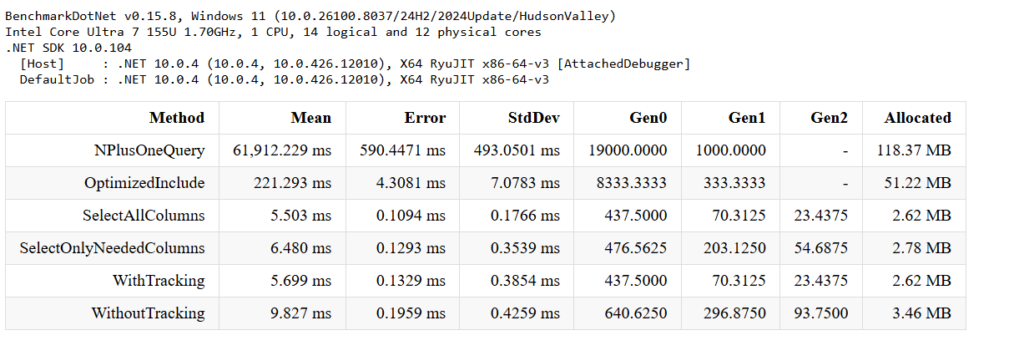
Our benchmark result shows that the N+1 query problem was over 280x slower than using Include(). However, optimizations like projection AsNoTracking() showed minimal gains in small datasets, highlighting that performance tuning depends heavily on scale.
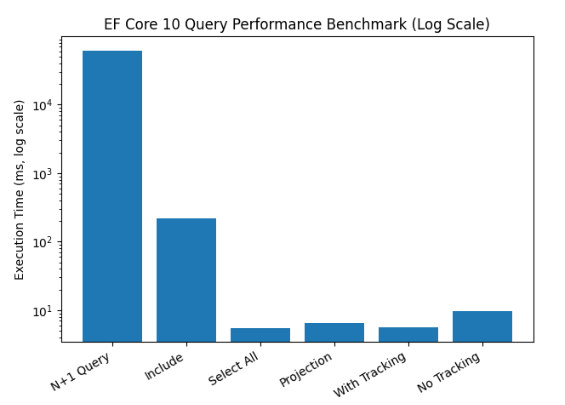
The chart below clearly shows how the N+1 query problem impacts performance compared to optimized queries using Include() and other techniques.
5 thoughts on “EF Core 10 Performance: Fixing 5 Common Slow Query Traps”
I like the way you explained everything.
thank you
Great content with very clear explanations.
Thank you
I like the way you explained everything.
Comments are closed.