Why OAuth2 + OpenID Connect for ASP.NET Core?
If you’re building APIs or web applications with ASP.NET Core in 2026, rolling your own authentication is almost always the wrong choice. ASP.NET Core OAuth2 and OpenID Connect (OIDC) are the industry-standard protocols that power secure authentication at Google, Microsoft, GitHub, and virtually every major platform and ASP.NET Core has built-in support for both.
Using these protocols means your application delegates trust to a proven identity provider (IdP) instead of storing raw passwords, implementing reset flows, and maintaining session state yourself. You get single sign-on (SSO), multi-factor authentication (MFA), and token-based security with few coding lines.
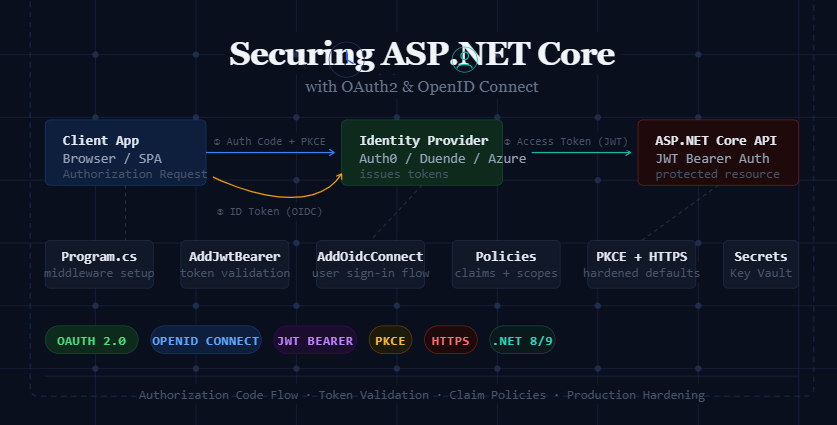
Core Concepts: OAuth2 vs OpenID Connect
These two protocols are often confused because OIDC is built on top of OAuth2. Understanding the difference between both is very important before writing a single line of code.
| Protocol | Purpose | What it returns | Use case |
|---|---|---|---|
| OAuth 2.0 | Authorization, grant access to resources | Access Token | API access, scoped permissions |
| OpenID Connect | Authentication, verify who the user is | ID Token (JWT) + Access Token | User login, SSO, identity claims |
In short: OAuth2 lets an app act on behalf of a user; OIDC proves who the user is. Most real-world applications need both OIDC to log the user in, and OAuth2 to call downstream APIs.
Choosing the Right Authorization Flow
OAuth2 defines several “flows” (also called grant types). Selecting the wrong one is a common security mistake.
| Flow | Best For | Security Level |
|---|---|---|
| Authorization Code + PKCE | Web apps, SPAs, mobile apps | ⭐⭐⭐⭐⭐ Recommended |
| Client Credentials | Machine-to-machine (M2M) services | ⭐⭐⭐⭐ |
| Implicit (deprecated) | Legacy SPAs avoid in new apps | ⭐⭐ Avoid |
| Resource Owner Password | Highly trusted first-party apps only | ⭐⭐ Avoid if possible |
Setting Up OAuth2 in ASP.NET Core
Step 1 — Install the required NuGet packages
# For JWT Bearer token validation
dotnet add package Microsoft.AspNetCore.Authentication.JwtBearer

# For OpenID Connect (web app login)
dotnet add package Microsoft.AspNetCore.Authentication.OpenIdConnect

# For cookie-based session persistence
dotnet add package Microsoft.AspNetCore.Authentication.Cookies
Step 2 — Configure appsettings.json
{
  "Authentication": {
    "Authority": "https://your-idp.example.com",
    "ClientId": "your-client-id",
    "ClientSecret": "<store-in-secrets-or-keyvault>",
    "Audience": "api://your-api-resource",
    "Scopes": ["openid", "profile", "email", "api.read"]
  }
}
Never commit ClientSecret to source control. Use dotnet user-secrets in development and Azure Key Vault or AWS Secrets Manager in production.
Adding OpenID Connect Authentication (Web App)
Program.cs

using Microsoft.AspNetCore.Authentication.Cookies;
using Microsoft.AspNetCore.Authentication.OpenIdConnect;

var builder = WebApplication.CreateBuilder(args);
var config = builder.Configuration;

builder.Services
  .AddAuthentication(options =>
  {
    options.DefaultScheme = CookieAuthenticationDefaults.AuthenticationScheme;
    options.DefaultChallengeScheme = OpenIdConnectDefaults.AuthenticationScheme;
  })
  .AddCookie(options =>
  {
    options.Cookie.HttpOnly = true;
    options.Cookie.SecurePolicy = CookieSecurePolicy.Always;
    options.Cookie.SameSite = SameSiteMode.Lax;
    options.ExpireTimeSpan = TimeSpan.FromHours(1);
    options.SlidingExpiration = true;
  })
  .AddOpenIdConnect(options =>
  {
    options.Authority   = config["Authentication:Authority"];
    options.ClientId    = config["Authentication:ClientId"];
    options.ClientSecret = config["Authentication:ClientSecret"];
    options.ResponseType = "code";          // Authorization Code flow
    options.UsePkce     = true;              // Always enable PKCE
    options.SaveTokens  = true;              // Store tokens in cookie
    options.GetClaimsFromUserInfoEndpoint = true;

    // Request the scopes your app needs
    options.Scope.Add("profile");
    options.Scope.Add("email");
    options.Scope.Add("api.read");

    // Map ID token claims to ASP.NET Core claims
    options.ClaimActions.MapJsonKey(ClaimTypes.Email, "email");
    options.ClaimActions.MapJsonKey(ClaimTypes.Name,  "name");
  });

builder.Services.AddAuthorization();

var app = builder.Build();

app.UseHttpsRedirection();
app.UseAuthentication();  // Must come before UseAuthorization
app.UseAuthorization();

app.MapControllers();
app.Run();
Validating JWT Bearer Tokens (API Projects)
For pure API projects that don’t serve HTML (such as a Web API consumed by a SPA or mobile app), use JWT Bearer authentication instead of OIDC + cookies. The API simply validates the token issued by your identity provider.
Program.cs (API project)

builder.Services
  .AddAuthentication(JwtBearerDefaults.AuthenticationScheme)
  .AddJwtBearer(options =>
  {
    options.Authority = config["Authentication:Authority"];
    options.Audience  = config["Authentication:Audience"];

    options.TokenValidationParameters = new TokenValidationParameters
    {
      ValidateIssuer           = true,
      ValidateAudience         = true,
      ValidateLifetime         = true,
      ValidateIssuerSigningKey = true,
      ClockSkew                = TimeSpan.FromSeconds(30),
    };

    // Optional: log detailed auth failures in development
    options.Events = new JwtBearerEvents
    {
      OnAuthenticationFailed = ctx =>
      {
        var logger = ctx.HttpContext
            .RequestServices
            .GetRequiredService<ILogger<Program>>();
        logger.LogWarning("JWT auth failed: {Error}", ctx.Exception.Message);
        return Task.CompletedTask;
      }
    };
  });
Setting
options.Authorityautomatically fetches the IdP’s discovery document (/.well-known/openid-configuration) and validates signing keys. You don’t need to hard-code public keys.
Authorization Policies and Claims
Once a user is authenticated, use policy-based authorization to control what they can do. Policies are more flexible than [Authorize(Roles = "Admin")] and let you combine claims, scopes, and custom requirements.
Program.cs — define policies

builder.Services.AddAuthorization(options =>
{
  // Require a specific OAuth2 scope
  options.AddPolicy("ReadData", policy =>
    policy.RequireClaim("scope", "api.read"));

  // Require role from ID token claims
  options.AddPolicy("AdminOnly", policy =>
    policy.RequireRole("Admin"));

  // Combine multiple requirements
  options.AddPolicy("PowerUser", policy =>
  {
    policy.RequireAuthenticatedUser();
    policy.RequireClaim("scope", "api.write");
    policy.RequireClaim("email_verified", "true");
  });
});
OrdersController.cs — apply policies
[ApiController]
[Route("api/[controller]")]
public class OrdersController : ControllerBase
{
[HttpGet]
[Authorize(Policy = "ReadData")]
public IActionResult GetOrders() { /* ... */ }
[HttpPost]
[Authorize(Policy = "AdvanceUser")]
public IActionResult CreateOrder() { /* ... */ }
[HttpDelete("{id}")]
[Authorize(Policy = "AdminOnly")]
public IActionResult DeleteOrder(int id) { /* ... */ }
}Production Security Best Practices
Always use PKCE with the Authorization Code Flow
Set options.UsePkce = true It’s the single most impactful protection against authorization code interception attacks, especially for SPAs and mobile apps.
Store secrets in a vault, never in appsettings
Use dotnet user-secrets locally, and Azure Key Vault / AWS Secrets Manager or environment variables injected by your CI/CD pipeline in production.
Validate token audience and issuer
Always set ValidateIssuer = true and ValidateAudience = true. An attacker who obtains a token from one of your other services should not be able to use it on this API.
Set short token lifetimes + use refresh tokens
Access tokens should live 5–15 minutes. Pair them with refresh tokens (stored securely, ideally rotated on every use) for a seamless user experience without long-lived vulnerable tokens.
Enable HTTPS everywhere + HSTS
Call app.UseHsts() in production and app.UseHttpsRedirection(). OAuth2 tokens in transit over HTTP is a critical vulnerability.
Implement token revocation for sensitive logout
On sign-out, call your IdP’s revocation endpoint (/connect/revocation) to invalidate refresh tokens — not just clear the local cookie.
Audit and log auth events
Hook into JwtBearerEvents and OpenIdConnectEvents to emit structured logs on failures, token refresh, and policy denials. Feed them into your SIEM.
Security Checklist Before Going Live
- Authorization Code + PKCE flow is used (not Implicit)
- Client secret is stored in a vault / environment variable — not in source code
- Token issuer and audience are validated on every request
- Access token lifetime is 15 minutes or less
- Refresh tokens are rotated and stored securely (HttpOnly cookie or encrypted store)
- HTTPS is enforced app-wide; HSTS is configured
- Cookies use
HttpOnly,Secure, andSameSite=Lax - CORS is configured to allow only your known origins
- Auth failures are logged with correlation IDs
- Token revocation endpoint is called on logout
- Discovery document is cached (not fetched on every request)
- Rate limiting / brute-force protection is enabled on your IdP
3 thoughts on “ASP.NET Core OAuth2 and OpenID Connect: Complete Security Guide”
Great article, very helpful!
thank you very much
I learned something new from this post.
Comments are closed.