If you want to get more traffic from Google without spending a lot of money on ads, optimizing your search appearance is one of the smartest things you can do for that. A Free SERP Preview Tool helps you to see exactly how your website appears in Google search results before publishing your page on your website.
Try the tool here: SERP Preview Tool
What is a SERP Preview Tool?
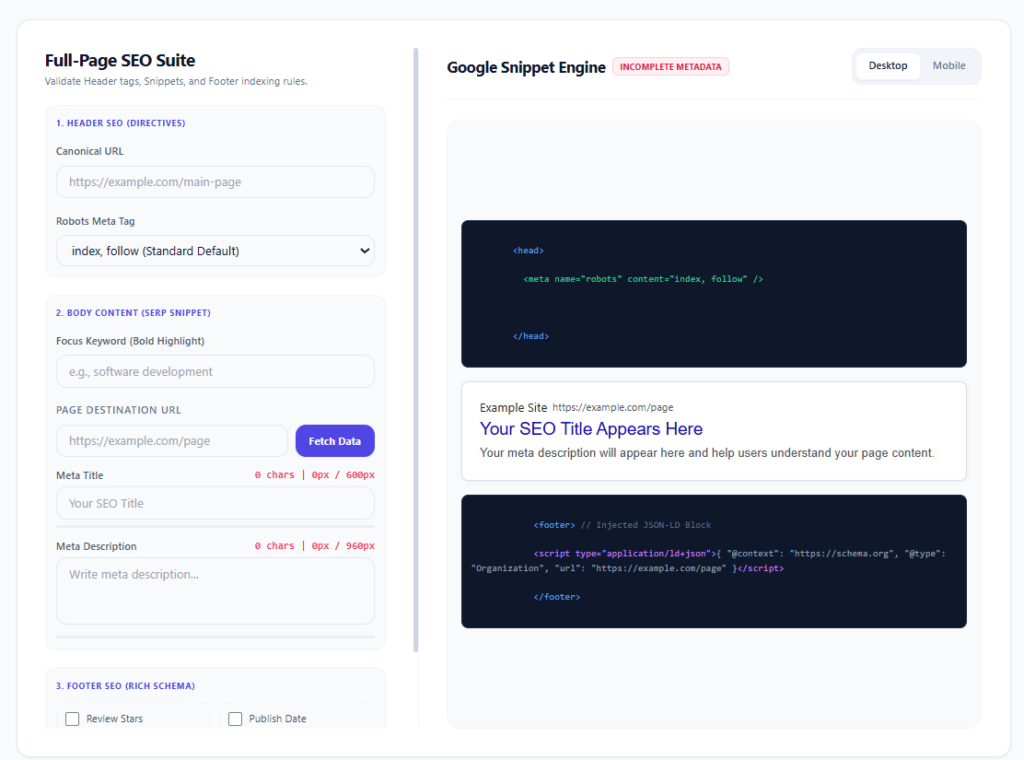
A SERP (Search Engine Results Page) Preview Tool is an SEO utility that helps you imagine how your webpage will appear in Google search results before publishing it live.
When someone searches on Google, they usually see three main elements:
- SEO Title — The clickable blue headline users see first
- Meta Description — A short summary explaining the page content
- URL Slug — The webpage address displayed below the title
A SERP Preview Tool simulates this Google search snippet in real time so you can optimize it for better visibility and more clicks.
Why is This Important?
Google only displays a limited number of characters for titles and descriptions. If your content is too long, Google cuts it off with “…”.
Example:
❌ Bad ExampleBest Free SEO Tool for Beginners and Professional Digital Marketing Experts in 2026...
✅ Better ExampleFree SERP Preview Tool for Better SEO Results
Using a SERP simulator helps you:
- Prevent cut-off titles and descriptions
- Improve click-through rates (CTR)
- Create more attractive search snippets
- Optimize mobile and desktop search appearance
- Make your pages look professional in Google results
What Can You Preview?
A SERP Preview Tool usually allows you to test:
1. SEO Title
Your page title should:
- Include your main keyword
- Stay within the recommended length
- Encourage users to click
2. Meta Description
The description should:
- Clearly explain the page
- Include relevant keywords naturally
- Add a call-to-action
3. URL Slug
A clean URL helps both users and search engines understand the page topic.
Example:
- Bad URL:
example.com/page?id=12345 - Good URL:
example.com/free-serp-preview-tool
Real-Time SEO Optimization
Modern SERP Preview Tools update instantly while typing. This allows users to:
- Experiment with different titles
- Test keyword placement
- Improve readability
- Check mobile friendliness
This is especially useful for:
- Bloggers
- SEO beginners
- Digital marketers
- Affiliate marketers
- Website owners
Desktop & Mobile Preview
Google search results look different on desktop and mobile devices. A good SERP Preview Tool helps you preview both versions so your content looks optimized everywhere.
Example of a Google Search Snippet
SEO Title:
Free SERP Preview Tool for Better Rankings
URL:
hub.csharpcodeexcellent.com/serp-preview-tool
Meta Description:
Preview your Google search snippet instantly and optimize titles, descriptions, and URLs for better SEO performance.
This preview helps you understand exactly what users will see before your page appears in Google Search.
Features of Our Free SERP Preview Tool
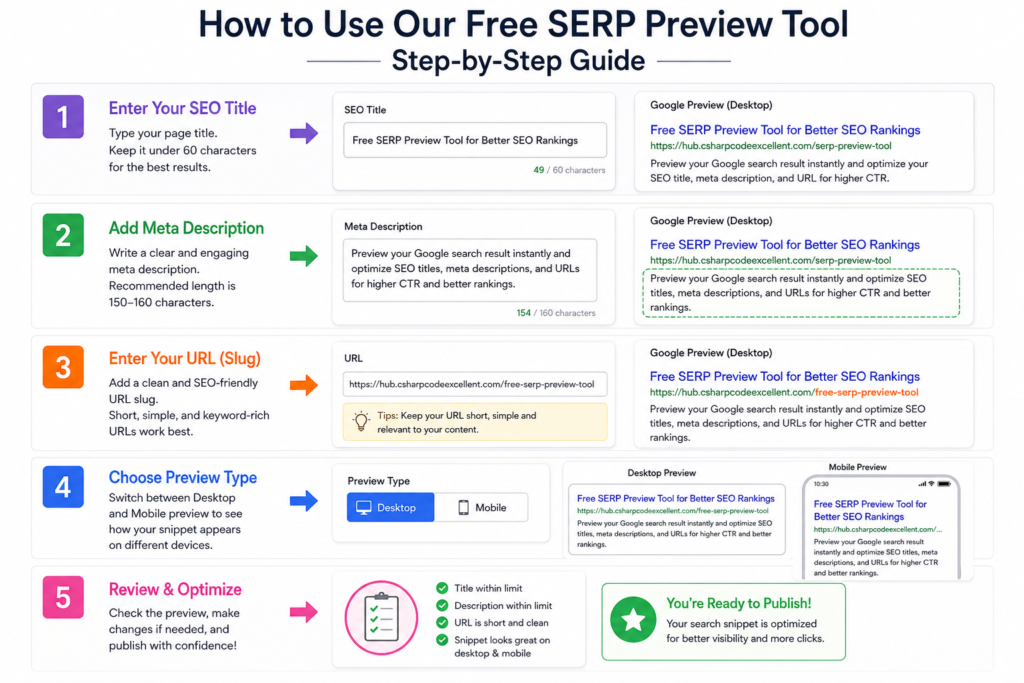
The SERP Preview Tool is designed to help bloggers, SEO beginners, developers, and digital marketers create search snippets that attract more clicks from Google Search.
Here are the main features explained with examples:
1. Live Google Search Preview
The tool shows a real-time preview of how your page may appear on Google Search while you type.
Example
If you enter:
- SEO Title:
Free SERP Preview Tool for Better Rankings - Meta Description:
Optimize your SEO title and meta description with our free SERP simulator tool. - URL:
hub.csharpcodeexcellent.com/serp-preview-tool
The preview instantly displays a Google-style search result snippet.
Why It Helps
You can immediately see:
- Whether the title looks attractive
- If the description is readable
- How the final search result may appear to users
This saves time and improves SEO optimization before publishing content.
2. SEO Title Character Counter
Google usually displays around 50–60 characters for titles. If the title is too long, it gets cut off.
Example
❌ Too LongThe Best Free SERP Preview Tool for Beginners and Professional SEO Experts in 2026
✅ OptimizedFree SERP Preview Tool for Better SEO
The tool automatically counts characters and warns users when the title exceeds the recommended limit.
Why It Helps
- Prevents title truncation
- Keeps search results clean
- Improves click-through rate (CTR)
3. Meta Description Length Checker
Meta descriptions should usually stay between 150–160 characters.
Example
❌ Too LongThis free SERP preview optimization tool allows bloggers, website owners, digital marketers, and businesses to preview and optimize Google search snippets easily.
✅ Better VersionPreview and optimize your Google search snippet with our free SERP Preview Tool for better SEO performance.
Why It Helps
- Avoids incomplete descriptions
- Makes snippets easier to read
- Encourages more clicks
4. URL Slug Preview
The tool displays how your webpage URL will appear in search results.
Example
❌ Bad URLexample.com/page?id=49384
✅ SEO-Friendly URLexample.com/free-serp-preview-tool
Why It Helps
Clean URLs:
- Look more professional
- Improve readability
- Help users understand page content
- Support SEO best practices
5. Mobile Search Preview
Google search results appear differently on smartphones. The tool allows users to preview mobile search snippets. Nowadays, most users use mobile phones for searching for things
Example
A long title may look fine on a desktop, but it gets cut off on mobile.
Desktop:Free SERP Preview Tool for Better Google Rankings
Mobile:Free SERP Preview Tool for Better...
Why It Helps
- Optimizes mobile SEO
- Improves user experience
- Helps target mobile users effectively
6. Beginner-Friendly Interface
The tool is simple and easy to use, even for people new to SEO.
Example
A beginner blogger can:
- Enter a title
- Add a description
- Preview the result instantly
No coding or technical SEO knowledge is required.
Why It Helps
- Easy learning experience
- Faster content optimization
- Suitable for students and small businesses
7. Fast and Lightweight
The tool works directly in the browser without complicated setup.
Benefits
- Quick loading speed
- Easy access on desktop and mobile
- Smooth user experience
Fast tools improve user engagement and can reduce bounce rates.
8. Helps Improve Click-Through Rate (CTR)
A better-looking Google snippet can attract more clicks even if competitors rank nearby.
Example
❌ Weak TitleSEO Tool
✅ Better TitleFree SERP Preview Tool to Improve Google CTR
The second version is clearer, keyword-focused, and more clickable.
Why It Helps
Higher CTR can:
- Increase organic traffic
- Improve engagement
- Support better SEO performance over time
9. Perfect for Multiple Users
This tool is useful for:
- Bloggers
- Freelancers
- YouTubers
- Affiliate marketers
- Students
- Developers
- Small businesses
Anyone creating content for Google Search can benefit from SERP preview optimization.
10. Completely Free to Use
Unlike many premium SEO platforms, this tool is accessible without subscriptions.
Why It Helps
Beginners can practice SEO optimization without spending money on expensive software tools.
Final Example
Before Optimization
Title:Home
Description:Welcome to my website.
After Using SERP Preview Tool
Title:Free SERP Preview Tool for Better SEO Rankings
Description:Preview Google search snippets instantly and optimize titles, descriptions, and URLs for higher CTR.
This optimized version looks more professional, keyword-rich, and user-friendly in Google Search results.