Introduction: The Cost of the Garbage Collector (GC)
One of the biggest advantages of modern .NET development is managed memory. Developers do not need to concern about manual memory allocation and deallocation like in C or C++. The .NET Garbage Collector (GC) get that concern on behalf of programmers, it automatically handles memory cleanup, making development safer and more productive. Here is the master class of C# memory management
However, “managed code” does not mean free performance.
When applications allocate too many objects on the heap, the Garbage Collector must frequently run to get back memory. This is the reason for several performance challenges:
- GC Pressure – Frequent object allocations increase the workload for the garbage collector.
- Stop-the-world pauses – The GC temporarily pauses application threads to get back memory.
- Heap fragmentation – Repeated allocations and deallocations create ineffective memory layouts.
In most enterprise applications, this overhead is acceptable. But in low-latency environments, even a small startup can cause serious problems.
Examples include:
- Real-time AI inference systems
- Financial trading platforms
- Game engines
- High-throughput web servers
In these systems, a 5–10 millisecond GC pause can affect performance significantly.
How can you guess what I try to discuss:
Achieve C++-level performance while maintaining C# safety and productivity.
With modern .NET features like Span<T>, Memory<T>, and ArrayPool<T>, developers can write zero-allocation high-performance code.
What Are Span and Memory?
Before dive to these modern performance techniques, we need to understand how this memory allocation works in .NET.
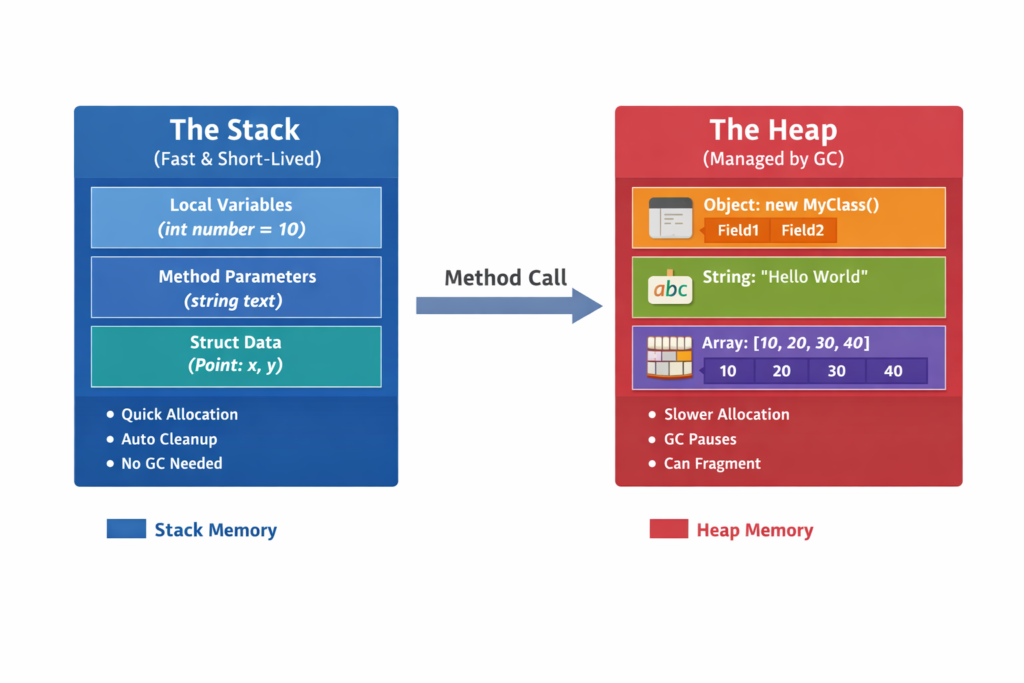
Stack Memory
The stack stores:
- Local variables
- Method parameters
- Struct values
Characteristics of stack memory:
- Extremely fast allocation
- Automatically released when the method exits
- No garbage collection required
Example:
void ProcessData()
{
    int number = 10; // Stored on the stack
}
In this memory allocation type is very efficient but has a limited size and lifetime
Heap Memory
The heap stores objects created with new.
Example:
string message = new string("Hello World");Heap memory characteristics:
- Larger storage capacity
- Managed by the Garbage Collector
- Allocation and cleanup are slower than stack operations
Every heap allocation increases GC pressure.
Span<T>: The View into Memory
Span<T> It is one of the most advanced memory allocation method adding to .NET. It represents a lightweight view over contiguous memory.
Key characteristics:
- Can point to stack memory
- Can point to heap arrays
- Does not allocate memory
- Extremely fast
- Stack-only structure
Span<T> is defined as a ref struct, meaning it cannot live on the heap.
Example:
Span<int> numbers = stackalloc int[5];
numbers[0] = 10;
numbers[1] = 20;
numbers[2] = 30;
Here, we allocate an array directly on the stack. Benifit of this memory allocation does not involve garbage collector allocation. The user can experience faster execution and automatic memory release.
Memory<T>: Heap-Safe Alternative
Because Span<T> is stack-only, it cannot be used in async methods.
This is where Memory<T> comes into the picture. Memory<T> Provides a heap-safe wrapper around memory buffers.
Example:
Memory<byte> buffer = new byte[1024];
Span<byte> span = buffer.Span;Characteristics:
| Feature | Span<T> | Memory<T> |
|---|---|---|
| Stack-only | Yes | No |
| Support Async | No | Yes |
| Heap-safe | No | Yes |
| Performance | Fast | Slightly lower than Span<T> |
Therefore:
- Use Span<T> for synchronous high-performance code
- Use Memory<T> when async is required
Zero-Allocation Patterns: Practical Examples
Now we are going to write a C# code for veryfy how these allocations are working. I create sample .NET console application for expain these zero allocation pattern
String Processing Without Allocation
Over 15 year experiese, I can say most of the developers create extra allocations when working with strings. This is a way to reduce it.
The Scenario: Extracting a “Product Code” from a long String
In traditional C#, developers use .Substring() a method that creates a new string object on the heap every time it is called. If you are processing a 1GB file, this creates massive Garbage Collector (GC) pressure.
1. The Project Setup
Create a Console Application for your benchmarks. Mixing benchmarks into your main Web API can skew the results due to background service interference.
# Create a new console app
dotnet new console -n MyPerformanceLab
cd MyPerformanceLab
# Add the BenchmarkDotNet nuget package (the industry standard)
2. Designing Your Benchmark Class
Create a new file called StringPerformance.cs. Use the [MemoryDiagnoser] attribute; this is what adds the high-value “Allocated Memory” column to your results.
using BenchmarkDotNet.Attributes;

namespace MyPerformanceLab
{
    [MemoryDiagnoser] // Essential for tracking GC and RAM
    [RankColumn]      // Add 1, 2, 3 ranking to your results
    public class StringPerformance
    {
        private const string TelemetryData = "ID:9982-XYZ-2026-LOG-DATA";
        private const int Length = 8;

        [Benchmark(Baseline = true)] // This is the "Before" (Standard)
        public string UsingSubstring()
        {
            int start = TelemetryData.IndexOf(':') + 1;
            return TelemetryData.Substring(start, Length);
        }

        [Benchmark] // This is the "After" (optimization)
        public ReadOnlySpan<char> UsingSpan()
        {
            ReadOnlySpan<char> span = TelemetryData.AsSpan();
            int start = span.IndexOf(':') + 1;
            return span.Slice(start, Length);
        }
    }
}
3. Triggering the Run
In your Program.cs, replace the default code with the BenchmarkRunner.
using BenchmarkDotNet.Running;

// This triggers the heavy-duty measurement cycle
var summary = BenchmarkRunner.Run<StringPerformance>();
This is my result. It unbelievable
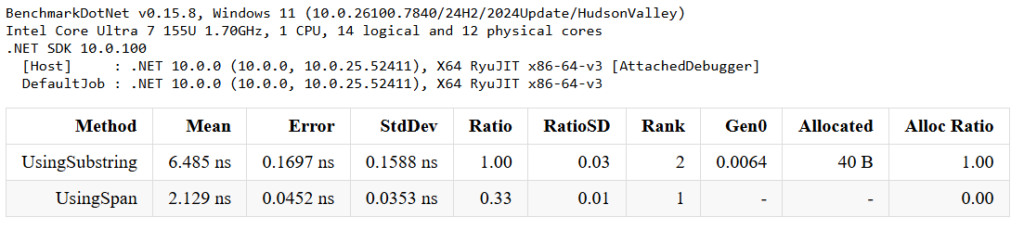
Output: You can clearly see that using Span is 3x time faster than using Substring
You can also download the full source code for these benchmarks on my GitHub Repository.
Advanced: MemoryPack and System.IO.Pipelines
Modern .NET frameworks internally use high-performance memory abstractions. Mainly have two technologies:
- MemoryPack
- System.IO.Pipelines
High-Performance IO with System.IO.Pipelines
System.IO.Pipelines provides a high-performance pipeline for reading and writing data streams. It powers modern web servers like Kestrel used in ASP.NET Core. Instead of allocating buffers repeatedly, pipelines use pooled buffers and spans.
Example:
Pipe pipe = new Pipe();

PipeWriter writer = pipe.Writer;
Span<byte> memory = writer.GetSpan(512);
writer.Advance(512);

await writer.FlushAsync();
Advantages:
- Zero-copy processing
- Reduced allocations
- High performance
Now you can understand how modern .NET web servers can handle millions of requests per second.
MemoryPack: Next-Generation Serialization
Traditional serialization often relies on JSON, which involves:
- Parsing text
- Allocating objects
- Mapping properties
This creates heavy Garbage Collector pressure.
MemoryPack uses binary serialization directly into buffers.
Advantages:
- Much faster serialization
- Minimal allocations
- Smaller payload sizes
Example concept:
var bytes = MemoryPackSerializer.Serialize(data);
var result = MemoryPackSerializer.Deserialize<MyType>(bytes);
This technique is used in:
- Game engines
- High-frequency trading
- Distributed microservices
Key Takeaways for You:
- Measure First: Use
BenchmarkDotNetbefore refactoring to identify actual bottlenecks. - Favor the Stack: Use
Span<T>for synchronous, tight loops to avoid the “Garbage Collection Tax.” - Think Economically: Every byte you don’t allocate is a byte you don’t pay for in the cloud.