When working with data in modern .NET applications, writing clean and efficient queries is mandatory. Whether you’re using LINQ to Objects, Entity Framework Core, or querying SQL databases, understanding how to perform joins in LINQ is a must.

In this article, you’ll learn:
- ✅ Performance tips for real-world applications
- ✅ How multi-column joins work in LINQ
- ✅ How to handle the same and different column names
- ✅ EF Core best practices (2026 edition)
- ✅ Method syntax vs query syntax
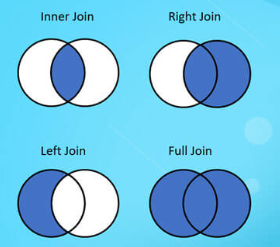
Why Multi-Column Joins in LINQ
In real-world applications, tables are often related by composite keys rather than a single column.
For example:
- Order + CompanyId
- EmployeeId + DepartmentId
- CountryCode + PhoneCode
To join these correctly, you must match multiple fields together.
Scenario 1: Column Names Are the Same
If both tables have identical column names, the join is clean and straightforward.
✔ Query Syntax
var result = from tbl1 in Table1
             join tbl2 in Table2
             on new { tbl1.Field1, tbl1.Field2 }
             equals new { tbl2.Field1, tbl2.Field2 }
             select new
             {
                 tbl1,
                 tbl2
             };
✔ Method Syntax
var result = Table1.Join(
    Table2,
    tbl1 => new { tbl1.Field1, tbl1.Field2 },
    tbl2 => new { tbl2.Field1, tbl2.Field2 },
    (tbl1, tbl2) => new { tbl1, tbl2 }
);
Scenario 2: Column Names Are Different
If the column names differ, you must align them manually inside the anonymous type.
✔ Query Syntax
var result = from tbl1 in Table1
             join tbl2 in Table2
             on new { A = tbl1.Field1, B = tbl1.Field2 }
             equals new { A = tbl2.OtherField1, B = tbl2.OtherField2 }
             select new
             {
                 tbl1,
                 tbl2
             };
✔ Method Syntax
var result = Table1.Join(
    Table2,
    tbl1 => new { A = tbl1.Field1, B = tbl1.Field2 },
    tbl2 => new { A = tbl2.OtherField1, B = tbl2.OtherField2 },
    (tbl1, tbl2) => new { tbl1, tbl2 }
);
💡 The key rule:
Anonymous type property names must match on both sides.
Real-World EF Core Example (.NET 8/9)
Assume we have two tables called:
OrdersInvoices
Both are related by:
- OrderId
- CompanyId
var data = await _context.Orders
    .Join(
        _context.Invoices,
        order => new { order.OrderId, order.CompanyId },
        invoice => new { invoice.OrderId, invoice.CompanyId },
        (order, invoice) => new
        {
            order.OrderNumber,
            invoice.InvoiceNumber,
            invoice.Amount
        })
    .ToListAsync();
Left Join with Multiple Columns
LINQ doesn’t have direct LEFT JOIN syntax you, use GroupJoin.
var result = from tbl1 in Table1
             join tbl2 in Table2
             on new { tbl1.Field1, tbl1.Field2 }
             equals new { tbl2.Field1, tbl2.Field2 }
             into grouping
             from tbl2 in grouping.DefaultIfEmpty()
             select new
             {
                 tbl1,
                 tbl2
             };